


Concepts dictionary
Organizations
An organization is a logical grouping of resources like users, policies, and wallets. There are two types of organizations:Users
Turnkey users are resources within organizations or sub-organizations that can submit activities to Turnkey via a valid credential (e.g., API key, passkey). These requests can be made either by making direct API calls or through the Turnkey Dashboard. Users must be set up to authenticate to Turnkey with credentials (API keys, passkeys), or via other authentication methods such as OAuth, or email auth, with upper limits on credentials defined here in our resource limits. Users can also have associated “tags” which are logical groupings that can be referenced in policies. Users can only submit activities within their given organization — they cannot take action across organizations. There are two main types of users:
In parent organizations, a user often maps to an individual from your team with administrative privileges and responsibilities. In sub-organizations, which are often used to manage an end user’s resources, a user can represent an end user and their credentials. If there is only one user representing the end user with only end-user controlled credentials then this would be more akin to a standard non-custodial setup. However, this flexible primitive can often represent other aspects of your backend or application. For example, a Turnkey user might map to a:
- Backend service used to automate certain transactions
- Service with delegated access to take action on behalf of an end user
- Required co-signer for all end user transactions
Credentials
Interacting with the Turnkey API requires each API call to be authenticated by cryptographically stamping it with a credential. This process is abstracted away in our SDKs and ensures that the request cannot be tampered with as it travels to the secure enclave. Credentials include API keys and passkeys / Webauthn devices for all Users, while sub-organization users can also use email or OAuth to authenticate. Email and OAuth leverage API keys under the hood. For more information on Turnkey user credentials look here.Activities
Activities are specific actions taken by users, such as signing a transaction, adding a new user, or creating a sub-organization. Activity requests are always evaluated through our policy engine, and can evaluate to ALLOW, DENY, or REQUIRES_CONSENSUS (i.e., requires additional approvals before being allowed). For more information on Turnkey activities look here.Policies
Policies, enforced by Turnkey’s policy engine, grant users permissions to perform activities. These policies are a series of logical statements (e.g., User ID == 123 or ETH address == 0x543…9b34) that evaluate to either “ALLOW” or “DENY.” Through these policies you can set granular controls on which users can take which actions with which wallets. Policies can also require multi-party approval / consensus, meaning a threshold of certain users will be required to approve the activity. As mentioned above, the root quorum will bypass the policy engine. For more information on Turnkey policies look here.Wallets and Private Keys
Resources used to generate crypto addresses and sign transactions or messages. We currently support secp256k1 and ed25519 curves and have two main types:
Learn more about leveraging Wallets across different crypto ecosystems on our Ecosystem Support page.
Typical implementations
Transaction Automation
Transaction automation entails a business signing transactions on its own behalf. For example, automating payments flows, managing smart contract deployment or programmatically trading in DeFi.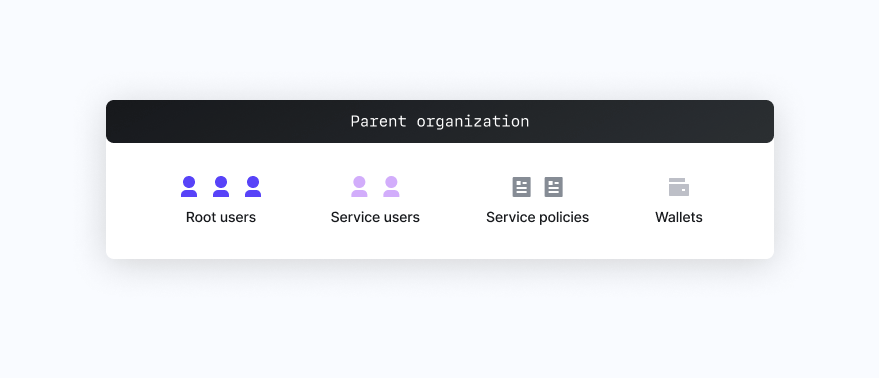
- Root Users: After initial setup of your parent organization, set a reasonable root quorum (e.g., 2 of 3), attach backup credentials to each user for safekeeping, and only use the root users in a “break glass” scenario.
- Service Users: Create different users for separate services and/or approval workflows. For example, you might have user A that can automatically sign any transaction with Wallet X, but require both user A and user B to approve transactions with Wallet B.
- Service Policies: Set appropriately restrictive policies based on your security needs.
- Wallets: Create separate wallets where differentiated policies are needed, otherwise just leverage multiple wallet accounts within a single wallet.
Embedded Wallets
Embedded wallets entail a business creating non-custodial wallets controlled by its end users. For example, allowing an end user to create and use a wallet via Web2 authentication methods like email or OAuth.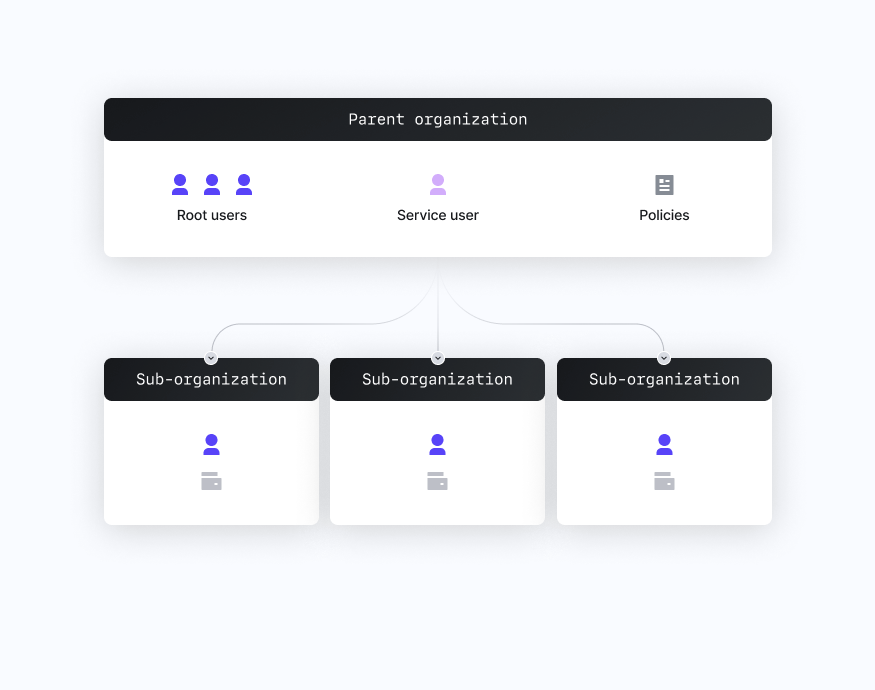
- Root Users: After initial setup of your parent organization, set a reasonable root quorum (e.g., 2 of 3), attach backup credentials to each user for safekeeping, and only use the root users in a “break glass” scenario.
- Normal Users: Create a single service user used for user onboarding and authentication.
- Policies: Set a policy granting the user permission to
CREATE_SUB_ORGANIZATION,EMAIL_AUTH,OAUTH,OTP_AUTH. For examples of how to create such policies look here. - Sub-organizations: Create individual sub-organizations for each user that contain a single root user with any relevant credentials, and a single wallet with any relevant wallet accounts.
Overview
Understand Turnkey’s core features and fundamentals.
Organizations
Learn about Organizations on Turnkey
Sub-Organizations
Learn about sub-organizations on Turnkey
Users
3 items
Wallets
Learn about Wallets on Turnkey
Resource Limits
Organization resource limits
Policies
5 items